What Is DNS? How the Internet Finds What You’re Looking For
When you type a website like www.csprimer.in into your browser, how does your computer know where to find it? That’s the job of the Domain Name System (DNS).

What is a DNS ?
It is the Internet’s phonebook that translates human-friendly names into machine-friendly IP addresses. Think of it as a “Distributed Database”.
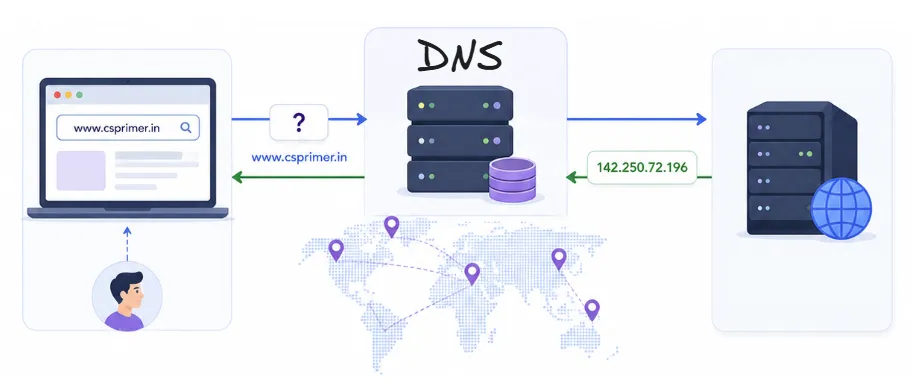
- Computers communicate using IP addresses like
142.250.72.196. - But humans prefer easy-to-remember names like
www.csprimer.in.
DNS maps domain names to IP addresses, so your browser can connect to the right server.
DNS Components
- Root DNS servers - At the top of the DNS hierarchy
- TLD servers - Handle domains like .com, .org, .net
- Authoritative DNS servers - Hold actual IP info for domain names
- Local DNS resolver - Typically run by your ISP or OS
How DNS Works (The Lookup Process)
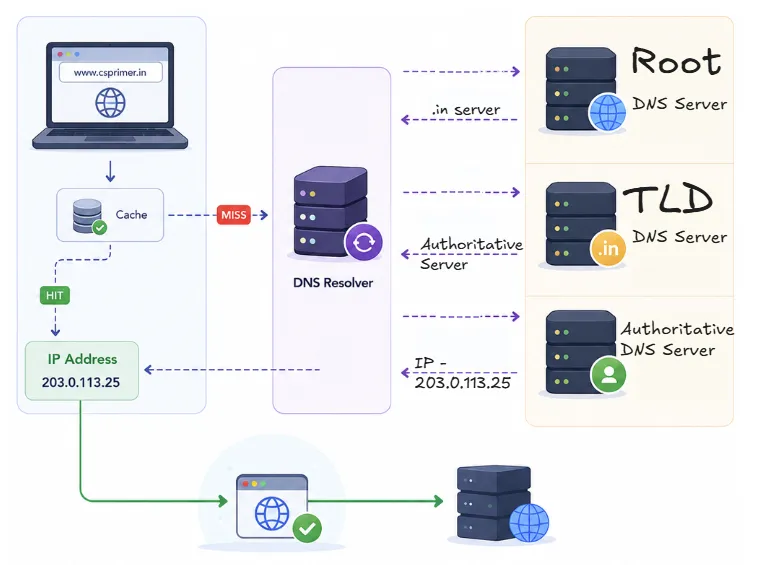
- You type www.csprimer.in into your browser.
- Your computer checks if it already knows the IP (via cache).
- If not, it asks a DNS resolver, which queries:
- Root DNS server → gives the .in server
- TLD DNS server (.in) → gives the authoritative server
- Authoritative DNS server → gives the IP for www.csprimer.in
- Your browser uses the IP to connect to the website.
Common DNS Record Types
| Type | Purpose |
|---|---|
A | Maps a domain to an IPv4 address |
AAAA | Maps a domain to an IPv6 address |
CNAME | Alias from one name to another |
MX | Mail server for a domain |
NS | Name server that tells the Authoritative server for the domain |