From IP to MAC- What Happens Just Below the Internet Layer
When you tap a video inside the YouTube app on your phone, your device doesn’t broadcast directly to Google’s data center.
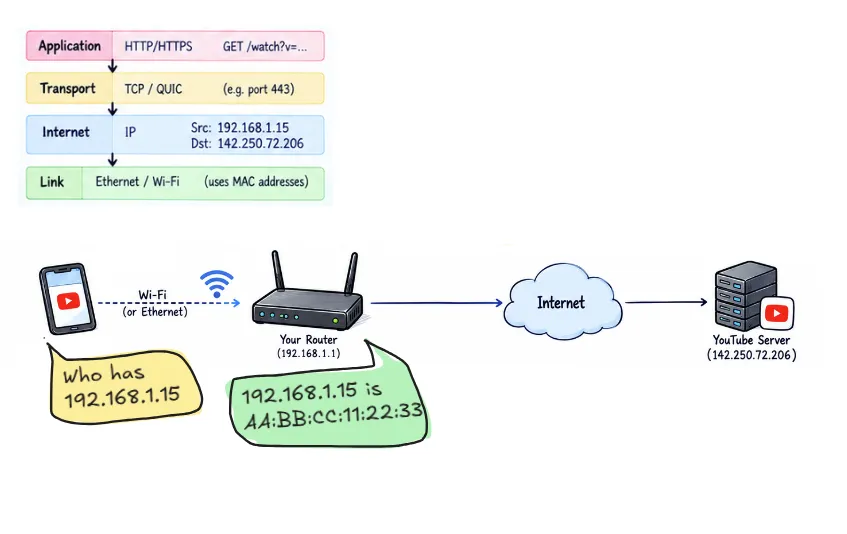
Before that request can cross autonomous systems on the public internet, it must complete its single most critical hop: leaving your local network.
While the Internet Protocol (IP) handles global logical routing, it cannot physically modulate signals onto copper wire, glass fiber, or radio waves. That responsibility belongs to the Link Layer.
The Network Stack Context
A standard web request typically builds downward through the network stack:
- Application Layer (HTTP/HTTPS): Defines what is requested (e.g., GET /watch?v=…).
- Transport Layer (TCP / QUIC): Manages flow control, connection state, and segment ordering via port numbers.
- Internet Layer (IPv4/IPv6): Adds source and destination IP addresses for end-to-end logical delivery across boundaries.
But IP doesn’t actually put bits onto Wi-Fi or an Ethernet cable. That’s the job of the link layer.
The link layer is concerned with communication across a single local link.
Logical IP vs. Physical MAC Addresses
After resolving youtube.com via DNS to an IP address (e.g., 142.250.72.206), your phone evaluates its local routing table:
- It compares the destination IP against its own subnet mask (e.g., 192.168.1.0/24).
- It recognizes that 142.250.72.206 is off-link (outside the local network).
- Packets destined off-link must be handed off to the local Default Gateway (your router, typically 192.168.1.1).
At Link Layer, devices don’t talk to IP addresses; they talk to Media Access Control (MAC) addresses—48-bit physical identifiers burned into network interface cards (NICs). To send the packet to the gateway, your phone needs the router’s physical MAC address.
Address Resolution Protocol (ARP)
ARP (Address Resolution Protocol) finds the MAC address for an IPv4 address on the local network.
Why? Because a device may know the destination’s IP address, but Ethernet/Wi-Fi needs a MAC address to deliver the frame.
- It sends an ARP request over Wi-Fi:
“Who has IP
192.168.1.1?” (That’s usually your router’s IP) - Your router replies:
“My MAC is
AB:CD:EF:12:34:56” - Your phone stores this in its ARP cache and sends the YouTube request framed for that MAC
Note: In IPv6 networks, ARP is replaced by Neighbor Discovery Protocol (NDP) running over ICMPv6.
The Ethernet Frame: Packaging for Local Travel
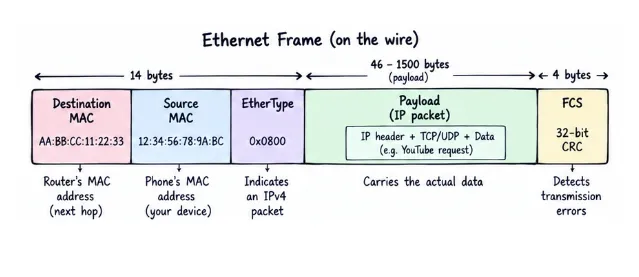
Once the phone knows the router’s MAC address, it puts the IP packet inside an Ethernet frame so it can travel across the local network.
| Field | Value | Purpose |
|---|---|---|
| Destination MAC | AA:BB:CC:11:22:33 | Router’s MAC address |
| Source MAC | 12:34:56:78:9A:BC | Phone’s MAC address |
| EtherType | 0x0800 | Indicates an IPv4 packet |
| Payload | Complete IP packet | Carries the actual data |
| FCS | 32-bit CRC | Detects transmission errors |
The important part is that the Link layer and Network layer have different destinations:
- Link layer: Delivers the frame to the next hop (the router).
- Network layer: Carries the packet toward the final destination (142.250.72.206).
- Transport layer: The IP packet also contains the transport segment (e.g., TCP or UDP) carrying the application’s data.
At each router, the old Ethernet frame is removed and a new Link-layer frame is created for the next hop. The Network-layer IP addresses generally remain unchanged as the packet travels across the network, except when something such as NAT modifies them.
Wi-Fi vs. Ethernet: Over-the-Air Delivery
Whether the phone uses Ethernet or Wi-Fi, the Link layer’s job is the same: deliver data to the next device on the local network.
Wi-Fi has some additional challenges because the wireless medium is shared:
- Shared medium: Multiple devices use the same radio channel, so Wi-Fi uses CSMA/CA and random backoff to reduce collisions.
- Different frame format: Wi-Fi frames contain additional addressing information because an access point may be forwarding traffic between wireless and wired networks.
When the router receives the Wi-Fi frame:
- It verifies the frame’s integrity using the FCS/CRC.
- It removes the Wi-Fi frame header and trailer, exposing the Network-layer IP packet.
- It reads the destination IP (142.250.72.206) and determines where to forward it.
- It may perform NAT, replacing the phone’s private IP with the router’s public IP.
- It creates a new Link-layer frame appropriate for its WAN connection and sends the packet toward the ISP.
The key idea: The Link layer gets the packet to the next hop. The Network layer determines where the packet ultimately needs to go.