Introduction to Git
This article belongs to the Git Basics to Advanced course, which is currently being revisited with updated architectural patterns and content. Content may be refined shortly.
1. What is Version Control?
Version control systems (VCS) track and coordinate modifications to a codebase over time. They allow software engineers to review historical snapshots, revert mistakes, and collaborate seamlessly across teams.
Earlier systems like CVS and SVN relied on a centralized architecture: a single central repository held the complete history of the code. If that server was unreachable, developers could not record commits or review past versions.
Git is a distributed version control system (DVCS). Every developer maintains a full-fidelity, independent local repository on their machine—complete with the entire commit history and branch graph. Developers commit, branch, and review history entirely offline, synchronizing with remote repositories (such as GitHub) only when ready.
2. Phases of Git Content

Git organizes files into three main phases:
- Working Directory (Working Tree): The local project folder where files are modified. Changes here are unstaged.
- Staging Area (Index): A temporary staging area where changes are collected and prepared with
git addbefore committing. - Git Repository: The permanent database inside the
.gitdirectory where committed snapshots are recorded.
Three Phases of Git Content
Step 1 of 3: Working Tree: Modify FilesActive workspace where files are created & edited.
Prepared files staged via git add.
Immutable snapshots created via git commit.
$ echo "hello git" > app.js Files are edited in your local project workspace. Git detects modifications but has not recorded them yet.
3. How Git Records Changes: Commits as Snapshots

Unlike legacy systems that track file-by-file delta diffs, Git stores its history as a series of complete snapshots of the codebase:
- Commit C depends on parent commit B.
- Commit B depends on parent commit A.
Each commit contains:
- A cryptographic SHA-1 hash (e.g.
a1b2c3d) ensuring security and immutability. - A pointer to its parent commit(s), establishing an unbroken, verifiable historical chain (A → B → C).
- Author metadata, timestamp, and a descriptive message.
4. Branches in Git
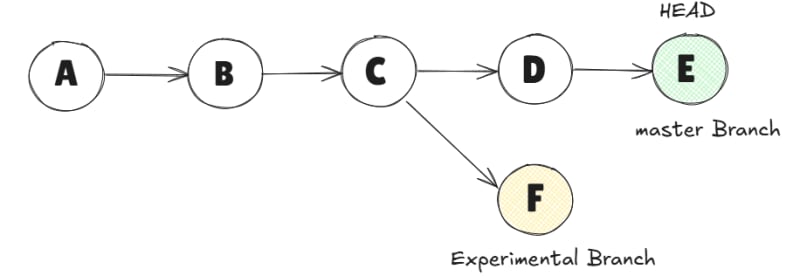
A branch allows developers to work on different versions of the project simultaneously. Instead of modifying the main codebase directly, changes can be made in a separate branch and later merged.
In the diagram:
- The main branch contains commits A → B → C → D → E.
- The experimental branch diverged at commit C (it does not contain D and E’s changes; similarly, the main branch remains unaffected by F’s changes).
Branch Divergence in Git
Step 1 of 3: Linear Main History
$ git log --oneline Production commits A → B → C on the main branch form a linear historical chain.
5. What is GitHub?
While Git is the command-line version control tool running locally on your computer, GitHub is a remote hosting service commonly used by teams as a centralized upstream repository. Developers push their local changes to GitHub and pull team updates from it, using pull requests to discuss and review code.
6. How is Git Different from Other Systems?
- Fast Branching: Branching in Git takes constant
O(1)time, whereas CVS and SVN require duplicating files inO(N)time. - Project Snapshots: Git stores changes as complete snapshots of the entire project, rather than tracking file-by-file diffs like older systems.
- Cryptographic Integrity: Changes are identified by cryptographic hash numbers (e.g.
a1b2c3d4) instead of arbitrary version numbers, ensuring tamper-proof security.