Merging in Git
This article belongs to the Git Basics to Advanced course, which is currently being revisited with updated architectural patterns and content. Content may be refined shortly.

1. What is Merging?
Merging combines changes from one branch into another. Most commonly, developers merge completed feature branches into the master or main branch.
# Switch to the receiving branch
git checkout master

# Merge the feature branch into master
git merge experimental
2. Fast-Forward Merge
A Fast-Forward Merge occurs when master has no new commits since the feature branch was created.
Because the feature branch directly contains master’s commits, Git simply advances the master pointer forward to match the feature branch without creating an extra merge commit.
Fast-Forward Merge
Step 1 of 2: Linear Extension Before Merge
$ git log --oneline --graph Master is at C1. Feature has C2 and C3. Master has no divergent commits since branching.
3. 3-Way Recursive Merge
A 3-Way (Recursive) Merge occurs when both master and experimental have progressed independently with new commits.
Git finds the common ancestor commit, combines the changes from both branches, and creates a new Merge Commit with two parent pointers:
3-Way Recursive Merge
Step 1 of 2: Divergent Branch Histories
$ git log --oneline --graph Both master (C2) and experimental (F1, F2) have progressed independently from common ancestor C1.
4. Handling Merge Conflicts
When both branches edit the same lines in a file, Git pauses the merge and displays conflict markers:
git status # Show conflicted files
cat file   # Inspect conflict markers
Conflict markers look like:
<<<<<<< HEAD
// Current branch version
=======
// Incoming branch version
>>>>>>> experimental
To resolve:
- Edit the file to keep the desired code and remove the marker lines (
<<<<<<<,=======,>>>>>>>). - Stage the resolved file:
git add file - Finalize the merge:
git commit -m "merged experimental branch into master"
Step through the interactive merge conflict workflow below:
Resolving Merge Conflicts
Step 1 of 4: Conflicting Parallel Commits
$ git log --graph --oneline --all Both master (commit C2) and experimental (commit F1) modified the same lines in file.txt.
5. Aborting a Merge
# If a conflict occurs and you want to cancel the merge:
git merge --abort

# If you already committed the merge locally and want to undo it:
git reset --hard HEAD~1
6. Cherry-Picking
Cherry-picking allows you to pick a specific commit from one branch and apply it to another without merging everything else.
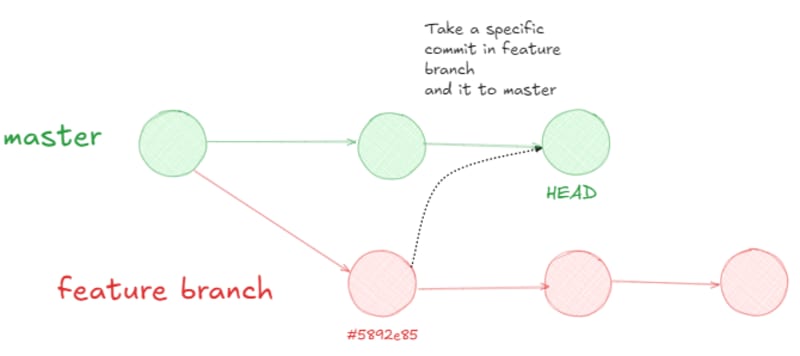
Cherry-Picking Commits
Step 1 of 2: Select Commit to Copy
$ git log feature --oneline Feature branch has commits F1 and F2. You want only the bugfix in F2 on master right now.
# Switch to master and apply a specific commit from feature:
git checkout master
git cherry-pick 5892e85